Homey is a smart home platform designed to bring devices from different brands and technologies into one connected system. With the Homey app, users can manage compatible devices, organize them by room, and create automations through Homey Flow.
For users who want a more flexible smart home setup, Homey provides a centralized way to connect sensors, lights, plugs, thermostats, cameras, and other smart home devices. Homey Pro and Homey Pro mini also support Matter and Thread, making them suitable options for adding Matter over Thread devices to a Homey smart home setup.
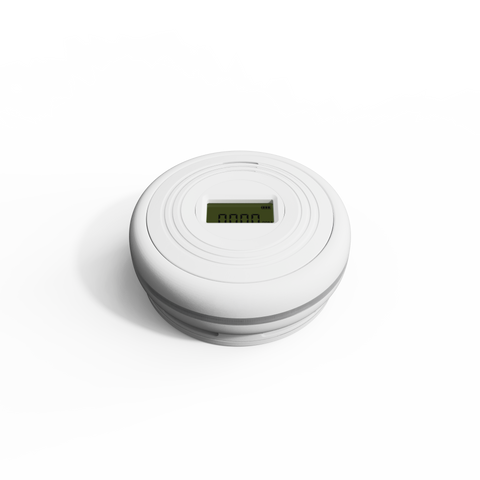
Sensereo MSC-1 is designed to work with Homey through Matter over Thread. As a Matter Smoke and Carbon Monoxide Alarm, MSC-1 can be added to the Homey ecosystem and become part of a connected home safety setup.
By pairing Sensereo MSC-1 with Homey, users can bring smoke and carbon monoxide alarm status into the Homey app and include MSC-1 in a broader smart home environment for monitoring, notifications, and automation.

Before Pairing MSC-1 with Homey
Since Sensereo MSC-1 uses Matter over Thread, your Homey setup needs to support Matter and Thread before pairing.
In general, you will need:
- Your Sensereo MSC-1 Matter Smoke and Carbon Monoxide Alarm.
- The Homey app installed on your phone.
- A Homey account signed in to the Homey app.
- A Homey Pro or Homey Pro mini with Matter and Thread support.
- The Matter QR code or manual pairing code for your Sensereo MSC-1.
For Matter over Thread setup, make sure your Homey hub is powered on, connected to your home network, and close enough to MSC-1 during pairing. A stable Thread network helps MSC-1 join the Homey ecosystem more smoothly.
Video Guide: Pair MSC-1 with Homey
Watch this video to see how Sensereo MSC-1 Matter Smoke and Carbon Monoxide Alarm is paired with Homey.
What You Need to Prepare
Before starting setup, make sure these items are ready:
- Your MSC-1 is powered on and ready for pairing.
- Your Homey Pro or Homey Pro mini is online.
- Your phone is signed in to the Homey app with the correct Homey account.
- Your phone has Bluetooth enabled for device commissioning.
- The Matter setup QR code or manual setup code is available.
For a smoother setup experience, complete pairing before mounting the smoke and carbon monoxide alarm on the ceiling. Keeping MSC-1 close to your Homey hub during setup can also help reduce pairing issues.
How MSC-1 Works with Homey
When pairing Sensereo MSC-1 with Homey, the Homey app uses the Matter setup code to identify the device and add it to your smart home. Because MSC-1 is a Thread-enabled Matter alarm, Homey Pro or Homey Pro mini helps connect it to the Thread network.
After MSC-1 is added, it will appear in the Homey app. Users can assign it to a room, rename it based on the installation location, and view its smoke and carbon monoxide alarm status inside the Homey ecosystem.
What Happens After Pairing
Once Sensereo MSC-1 is successfully paired with Homey, it becomes part of your Homey smart home setup. You can manage it together with other Homey-connected devices from the Homey app.
Because MSC-1 works with Homey through Matter over Thread, it is a suitable option for users who want to build a flexible and connected home safety setup around the Homey ecosystem.
Depending on your Homey configuration, MSC-1 can also be included in Homey Flow automations related to home safety, monitoring, and notifications.
Tips for a Smoother Pairing Experience
- Make sure your Homey app is updated.
- Confirm that your Homey Pro or Homey Pro mini is online.
- Keep MSC-1 close to your Homey hub during pairing.
- Make sure Bluetooth is enabled on your phone.
- Use the Matter QR code whenever possible for faster setup.
- If MSC-1 was previously paired with another ecosystem, reset it before pairing it with Homey again.
Troubleshooting
If MSC-1 does not appear during setup, check whether your Homey hub is online and supports Matter over Thread. Matter over Thread devices depend on a Thread Border Router during pairing, so an unavailable or incompatible setup may prevent the device from being added successfully.
If pairing fails, restart the Homey app, move MSC-1 closer to your Homey hub, and try again. If the device was previously added to Apple Home, Samsung SmartThings, Home Assistant, or another Matter platform, remove it from that platform and reset MSC-1 before pairing it with Homey.
Final Notes
Sensereo MSC-1 works with Homey through Matter over Thread, making it a suitable choice for users who want to add smoke and carbon monoxide alarm monitoring to their Homey smart home ecosystem.
With Homey support, MSC-1 can become part of a connected home safety setup while keeping its core smoke and CO detection functions local and reliable. For the best experience, use MSC-1 with a stable Homey setup, an online Homey Pro or Homey Pro mini, and a reliable home network.