Longer silent, dumb boxes nailed to the ceiling. They flash, beep, pulse, and even send phone alerts. But here’s the thing: do you actually know what your smart smoke detector is trying to tell you?
With the rise of Matter-compatible smart smoke detectors like the Sensereo MS-1, interpreting flashing LEDs and periodic beeps is no longer optional. It’s essential. These signals aren’t random. They speak a precise language that communicates everything from “All good here” to “Get out now.”
This guide will help you decode the patterns, understand what to do when you hear a smoke alarm chirping, and keep your smoke detection system running smoothly whether it’s a newer Matter-enabled device or another wireless model.
Why LED & Buzzer Patterns Matter
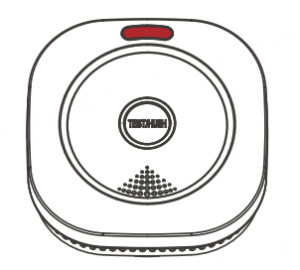
Your smoke alarm’s lights and sounds act like a built-in health report. Whether it’s a red pulse that says “I’m monitoring,” or a rapid red flash with a blaring siren that says “Evacuate!”, these indicators are vital.
Especially for Matter smoke detectors like the MS-1, which are part of broader Thread device networks, understanding these cues means you won’t need to guess what’s wrong or worse, miss a real emergency.
Common LED & Buzzer Signals: What They Mean
While patterns vary slightly between models, most smart smoke detectors follow a consistent signaling logic. Here’s a typical reference guide based on leading Matter-compatible devices:
Front LED & Buzzer (Main Device)
| Status | Front LED Indicator | Buzzer Sound | What It Means |
| Standby | Red flash every 45 seconds | None | Normal monitoring mode |
| Alarm (Smoke) | Red flashing rapidly | Loud pulsing alarm
(≥85 dB) |
Smoke detected – evacuate immediately |
| Hush Mode | Red flash once every 8 seconds | Silenced | Temporarily silenced for 8–10 minutes; will sound again if smoke persists |
| Self-Test | Red flashing | 3 short beeps | Confirms device function during test |
| Low Battery (Module) | Yellow flash every 45 seconds | 1 beep every 45 seconds | Communication module battery is low |
| Fault/Error | Yellow flashes in pattern | 2–3 beeps | Internal fault – see troubleshooting section |
Matter Module LED (Back of Device)
| LED Behavior | What It Indicates |
| Red/Green solid for ~5 seconds | Module initializing |
| Green flashing (up to 3 min) | Ready to pair with smart home via QR code |
| Green flashes 3 times, then off | Successfully paired; enters standby mode |
Note: The back Matter LED is only visible during setup, reset, or troubleshooting, and remains off during normal operation.
The Difference Between Chirping and Alarming
Not all beeps are equal. A chirp every 30 to 60 seconds typically signals maintenance issues: low battery, sensor failure, or network drop. A continuous alarm, especially paired with a red light, means danger. You need to evacuate.
If you hear your smoke alarm chirping, check the LED color:
Quick guide:
- Yellow + 1 beep: Battery low
- Yellow + 2–3 beeps: Device fault or internal error
- Red (slow blink): Device in hush mode
- Red (rapid blink): Smoke detected
Use your Matter app or refer to the physical device for clarity.
Troubleshooting: Common Issues & Fixes
Smart smoke detectors may occasionally behave unpredictably. Here’s how to respond:
| Issue | Possible Cause | Solution |
| No response during self-test | Power switch off or internal fault | Check rear switch and battery tab; if unresponsive, contact support |
| False alarms | Cooking smoke, steam, dust, or aerosols | Clean device; relocate away from kitchen or bathroom |
| Frequent false alarms | Poor installation placement | Follow installation guidelines; reposition unit |
| Yellow LED every 45s + beep | Low battery in communication module | Replace CR123A battery |
| Yellow LED pattern + 2–3 beeps | Internal error or sensor fault | Reset device; contact support if issue persists |
| Pairing issues with smart home app | Thread hub compatibility or incorrect steps | Double-check instructions; restart and retry |
| Matter LED doesn’t flash green after reset | Battery tab still attached or reset incomplete | Fully remove battery tab; follow reset instructions |
| Can’t re-pair after app removal | Device not factory reset | Follow full factory reset steps |
Smart Features You Should Know
Most Matter-compatible smoke detectors including models like the Sensereo MS-1 offer smart integrations that improve performance and reliability:
- Seamless control via Apple Home, Google Home, SmartThings, etc.
- Low-latency communication via Thread, even without Wi-Fi
- Built-in fallback alarms for offline conditions
- Real-time health monitoring via app and device indicators
These features combine the benefits of traditional alarms with the connectivity of smart tech.
Pro Tips for Staying Ahead of the Beeps
- Test Monthly: Press the test button to verify alarm, LED, and pairing status
- Clean Biannually: Dust buildup may cause false alarms or sensor degradation
- Track Battery Health: Replace the CR123A battery if yellow LED appears
- Follow Pairing Steps Closely: Proper Thread setup ensures reliable alerts
- Know When to Replace: Devices typically have a 10-year lifespan — check the label
Final Thoughts
Your smart smoke detector isn’t just looking out for fire. It’s also speaking to you through blinks and beeps. Learning that language means you’ll be better prepared to handle issues and emergencies with confidence.
Whether you’re monitoring one room or a whole network of devices, understanding LED and buzzer patterns helps ensure your system does what it’s meant to do: keep your home safe.
Looking for a reliable Matter-compatible smoke detector? Check out the Sensereo MS-1 for a well-rounded solution with smart integration and robust alerts. Explore more at Sensereo.com.